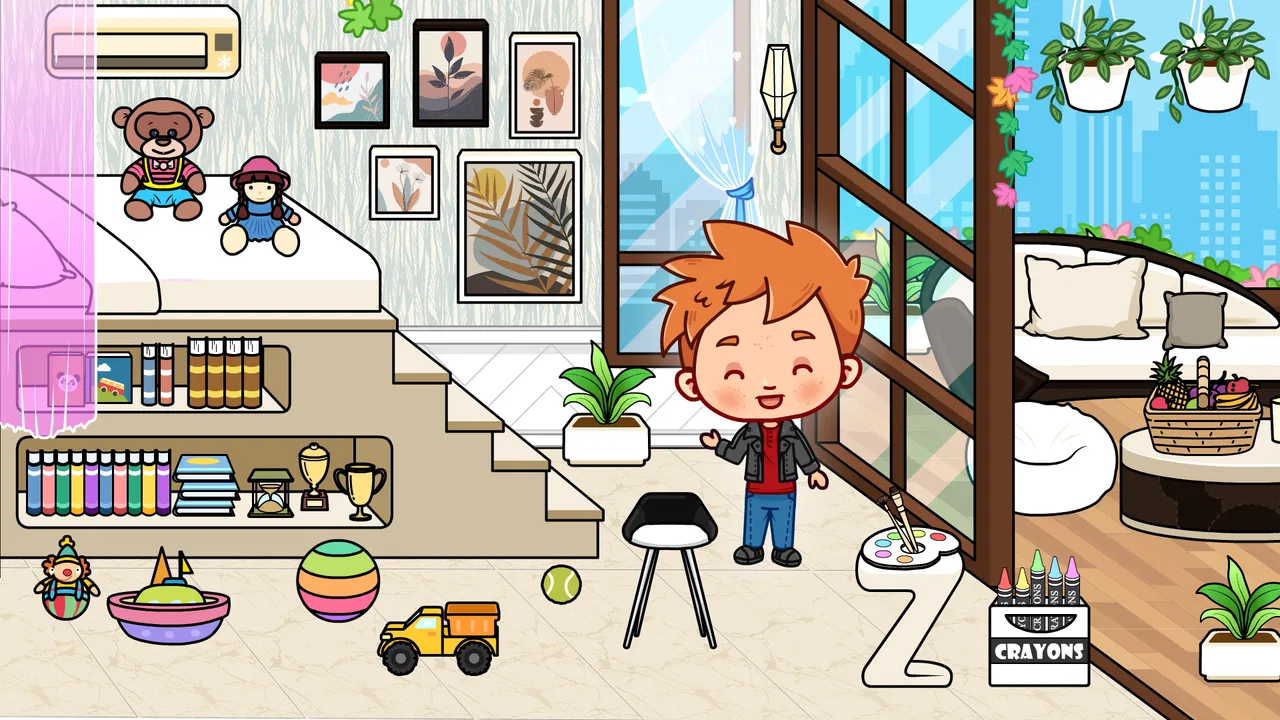
Tizi Modern Home & Room Design
- 4.2
- Rating
- 10.00M
- Installs
- Free
- Price

 Analysis by App-foxy
I enjoy room-design games most when they let me make choices without turning the experience into a complicated project-management exercise. Tizi Modern Home & Room Design takes that lighter approach. It is an educational game from Tizi Town Games where I can arrange a modern home, experiment with furniture, and use colorful decoration to create rooms that feel personal. The appeal is immediate: there is no pressure to understand a dense interface before I can start making a space.
After spending time with it, I see this as a relaxed creative activity rather than a serious interior-design simulator. That distinction matters. If you want detailed floor plans, realistic construction rules, or a deep economy, this is not the right destination. If you want a friendly way to explore combinations of furniture and room decoration, especially with younger players, it is much easier to recommend. The strongest part is the freedom to try ideas without worrying about making a permanent mistake.
How the current version feels in everyday use
The game is free to start, carries an Everyone age rating, and runs on Android devices using at least version 7.0. Its current version is 2.0.0, so I approached it as an active, current release rather than an old design app that has been left untouched. The store shows an average rating of 4.6 from roughly 25 thousand ratings, and the game has passed 10 million installs. Those figures suggest that its simple decorating format has reached a broad audience, but they do not change the basic experience: this is still a calm, visual game built around arranging a home.
You May Also Like

 Blood Strike: 2.5 Anniversary
Blood Strike’s Loadouts Turn Every Drop Into a Tactical Gamble
A close look at Blood Strike’s custom loadouts: how fast access to signature weapons reshapes its battle royale rhythm, rewards preparation, and narrows the gap between fights.

 Pandora - Music & Podcasts
Pandora’s Music Is Easy to Start, but Harder to Recover
Pandora’s strength is its low-effort path from a seed to a station. Its weak spot is how much confidence it asks you to place in connection, setup, and quiet recovery.

 8 Ball Pool
 Is Built on Rivalries, Rematches, and Routine
A close look at the rivalries, rematches, shared routines, and unanswered safety questions that turn a quick pool match into a persistent mobile community.

 Samsung Music
’s Quiet Strength Is Playing What You Already Own
Its reach comes less from spectacle than from dependable access to a personal library. That simplicity is both the app’s strongest retention engine and its ceiling.

 AccuWeather: Weather Radar
AccuWeather Review: A Quick, Clear Forecast for Everyday Decisions
For everyday plans, the best forecast is the one you can understand quickly. AccuWeather makes rain timing, radar, and local conditions easy to act on, with a few trade-offs.

 Hill Climb Racing
Why Hill Climb Racing Still Turns Crashes Into One More Run
A tiny car, a bumpy hill and one more upgrade: Hill Climb Racing keeps resurfacing because its simple chaos makes every near-miss feel personal.
More From Our News Desk



Starting a room is straightforward. I do not need to learn complicated controls or plan a full house before seeing a result. The main pleasure comes from looking at a space, choosing a style, and adjusting the visual balance until the room feels right. A modern sofa may need a stronger color around it, while a bright decorative item can work better as an accent than as the center of the room. These small decisions make the game more engaging than simply placing random objects.
The educational label makes sense in a broad, practical way. The game can encourage children to recognize colors, compare sizes, notice patterns, and think about how objects fit together. It is not teaching interior architecture, but it does create a safe setting for visual decision-making. I found that useful because a child can make a room look unusual and still learn from the result. A crowded arrangement becomes an easy opportunity to discuss spacing, while a room with too many competing colors can lead to a conversation about contrast.
A good fit for short creative sessions
I would use this game in short sessions rather than expecting a long, story-driven playthrough. It works well when I have a few minutes and want something quiet. A child can design one room after school, show it to a parent, and then return later with a different idea. That rhythm is more realistic than treating it like a game that demands a long uninterrupted commitment.
One everyday scenario shows where it fits best. Imagine a rainy afternoon when a child is tired of drawing on paper but does not want a competitive game. I would open this, choose a room, and suggest a simple challenge: make a cheerful bedroom using one main color, one contrasting color, and only a few standout decorations. The child still has creative control, but the small rule encourages planning instead of random tapping. Afterwards, comparing the first version with a calmer redesign can make the activity feel like a genuine design exercise.
Adults can enjoy that kind of session too, although the simplicity may feel limiting if you are used to detailed simulation games. I like it as a visual toy and a way to unwind. I would not choose it when I want a demanding objective system, a realistic renovation process, or a large community built around sharing elaborate designs.
What feels different from ordinary decorating alternatives
Many games in this category rely heavily on timed tasks, character stories, competitive events, or a long chain of unlocks. Tizi Modern Home & Room Design feels more direct. Its focus is the home itself, so I can spend attention on the look of a room instead of managing a character’s schedule or completing unrelated missions. That makes it particularly approachable for children who might find a larger life-simulation game overwhelming.
The trade-off is depth. A more advanced home-design simulator may offer precise measurements, construction decisions, stronger progression, or a wider range of practical constraints. Those systems can make every choice feel more meaningful, but they also create more friction. Here, the lighter structure is the feature. I can test a bold arrangement quickly, undo my thinking by changing the room, and keep experimenting without first learning a complicated rule set.
Compared with a drawing app, the game provides a more guided creative space. I am not starting with a blank canvas, so the experience is less intimidating. Compared with a traditional puzzle game, it gives me more ownership over the result and fewer correct-or-incorrect answers. That middle ground is the reason I would recommend it to someone who wants creativity without the pressure of producing a polished illustration.
Changes, practical limits, and who should download it
I’d use this section to weigh the game’s easy, low-pressure decorating against the limits that matter in day-to-day play. The most useful question is not whether it offers every design tool, but whether its simple creative loop suits the person holding the device—and whether the free start and optional purchases fit your household’s expectations.
What the current release means for new and existing players
The move to version 2.0.0 gives the game a clear current-state marker, but I would be careful not to read that number as a promise of a completely different experience. The confirmed release date is April 29, 2024, and the important point for a player is that the app presents itself as a modern room-design game that is still easy to approach. I noticed the value of that current positioning most in the basic flow: the game is best judged by how quickly it lets me create, adjust, and try again.
For someone installing it for the first time, the learning curve is gentle. I would not need a tutorial session before handing it to a child, although younger players may still benefit from an adult explaining the idea of arranging a room rather than simply tapping every available choice. For an existing user moving into the current version, the main benefit is continuity with the same central creative activity. The game remains suitable for casual decorating rather than becoming a complex management title.
That continuity can be positive for families. If a child already understands the basic idea, returning to the game should not require relearning an entirely new style of play. It also makes the app easier to share between siblings: one can create a colorful room, another can try a more restrained modern look, and neither needs a separate set of advanced gaming skills.
Three ways to get more from the decorating system
My first useful tip is to design with a limit before choosing furniture. For example, I might decide that the room will have one dominant color and two supporting tones. This prevents the colorful decoration from becoming visually noisy and turns a simple placement activity into a small design challenge. It also gives children a clear reason for each choice instead of encouraging them to fill every available space.
Second, I would make a “before and after” routine. I can create an initial room quickly, pause to look at the overall balance, and then change only one element at a time. Moving a large item, removing a bright accent, or grouping similar decorations can show which decision actually improved the room. This is more useful than repeatedly rebuilding everything because it teaches observation and comparison.
Third, I would use the game to explore function as well as appearance. Even in a playful setting, a room feels more convincing when objects seem to have a purpose. I can ask whether the arrangement leaves enough visual breathing room, whether the main furniture is easy to notice, and whether the decorations support the room’s mood. That approach gives the game more educational value than simply chasing the most colorful result.
Where the free model may affect the experience
The game is free, but in-app purchases are listed at $1.99 per item. That is important for parents to understand before allowing a child to play independently. The free entry makes it easy to test the basic experience, while optional purchases can affect how much content or choice a player wants to access. I would check the purchase settings on the device first, especially if the game is being used by a young child.
This model also changes how I judge the game’s long-term value. If I am satisfied with casual room creation, the free starting point may be enough. If I want every possible decorative option, I should expect the experience to involve optional spending. I would not treat that as an automatic flaw, but it is a genuine consideration when comparing the game with a fully open-ended drawing tool or a one-time-purchase alternative.
The Everyone rating makes the game suitable for a broad audience, yet age suitability is not the same as personal fit. A younger child may enjoy the colors and direct interaction, while an older player may quickly want more detailed customization. Parents should also consider whether they want a child to play without supervision around optional purchases. The game itself is approachable; the surrounding device settings still matter.
Who will enjoy it, and who should skip it
I would recommend it to children who enjoy arranging spaces, adults looking for a gentle creative distraction, and families wanting an activity that can prompt conversations about colors and organization. It is also a good choice for someone who finds full interior-design software intimidating. The modern-home theme gives enough direction to make decisions feel coherent without forcing me to follow a strict design brief.
I would skip it if my priority were realism. There is a major difference between placing attractive furniture in a playful environment and planning a room around actual dimensions, budgets, materials, or construction limitations. I would also choose another game if I wanted a strong narrative, competitive leaderboards, deep character development, or a progression system that constantly gives me new objectives.
Another reason to look elsewhere is if I dislike optional purchases in children’s games. Even though the game is free to begin, the listed price per item means the full experience may not feel equally open to every player. A drawing application may be better for unrestricted creative control, while a deeper simulation may be better for players who want meaningful constraints. This title succeeds precisely because it asks less, so it should not be judged as something it is not.
What I would watch as the game develops
The most important future question for me would be whether new releases deepen the creative process without making it harder to use. More variety is useful only when the interface remains clear. If the game adds more furniture and decoration, I would want those choices to support distinct room styles rather than create a crowded collection that is difficult for younger players to navigate.
I would also watch how well the game balances free creativity with optional purchases. The strongest version of this experience should allow a player to understand its appeal before spending money. A clear distinction between basic play and extra items would help parents make informed decisions and would keep the free starting experience welcoming.
Finally, I would hope future development preserves the quick, low-pressure character that makes the game accessible. Adding depth can be valuable, but not if it turns a simple creative session into a checklist. The best evolution would give experienced players more ways to refine a room while keeping the first few minutes comfortable for a child who has never used a design game before.
My overall view is positive, with the right expectations. Tizi Modern Home & Room Design is not a replacement for professional design software or a deep simulation. It is a friendly educational game that lets me explore modern furniture, color, and room decoration in a relaxed way. Tizi Town Games has chosen accessibility over complexity, and that choice works for its intended audience.
I would install it when I wanted a calm, visual activity that could be enjoyed alone or discussed with a child. I would start with the free experience, set purchase controls before handing over the device, and use small design challenges to make each session more thoughtful. If you want quick creativity and a welcoming home-design theme, this is worth trying. If you need realism, extensive progression, or unlimited options without optional spending, another category of app will serve you better.
FAQs for Tizi Modern Home & Room Design
01What is Tizi Modern Home & Room Design used for?
Tizi Modern Home & Room Design is an app designed for users who love interior decorating and want to experiment with various design ideas. It allows you to create and visualize room layouts, test different furniture arrangements, and explore color schemes. The app is perfect for both professional designers and hobbyists looking to refresh their living spaces.
02Is Tizi Modern Home & Room Design free to use?
Tizi Modern Home & Room Design offers a free version with essential features, making it accessible for anyone to try out. However, there may be in-app purchases or a premium version available that unlocks additional tools, design elements, and customization options, providing a richer experience for those seeking more advanced features.
03Can I share my designs with others using Tizi Modern Home & Room Design?
Yes, Tizi Modern Home & Room Design allows you to share your creations easily. You can export your designs and share them with friends, family, or clients via social media, email, or messaging apps. This feature is especially useful for collaborative projects or gathering feedback on your design ideas.
04Does Tizi Modern Home & Room Design require an internet connection?
Tizi Modern Home & Room Design generally does not require a constant internet connection to create and edit designs. However, some features, such as downloading additional content, updates, or accessing shared designs, might require internet access. Always check the specific app requirements for detailed information.
05Is Tizi Modern Home & Room Design suitable for professional use?
While Tizi Modern Home & Room Design is user-friendly for beginners, it also includes features that can benefit professionals in the field of interior design. With its extensive library of furniture and decor items, along with customizable options, professionals can use it to create detailed layouts and presentations for clients.
Pros
- User-friendly interface for easy navigation.
- Wide variety of design options available.
- Regular updates with new features.
- Offline mode available for convenience.
- Interactive tutorials for beginners.
Cons
- Limited free features; many in-app purchases.
- Occasional lag on older devices.
- No option for custom texture uploads.
- Ads can be intrusive at times.
- Requires significant storage space.

Tizi Modern Home & Room Design
Gallery